
Claude Skills: The Complete Guide to Building AI Workflows That Actually Work
Quick Answer
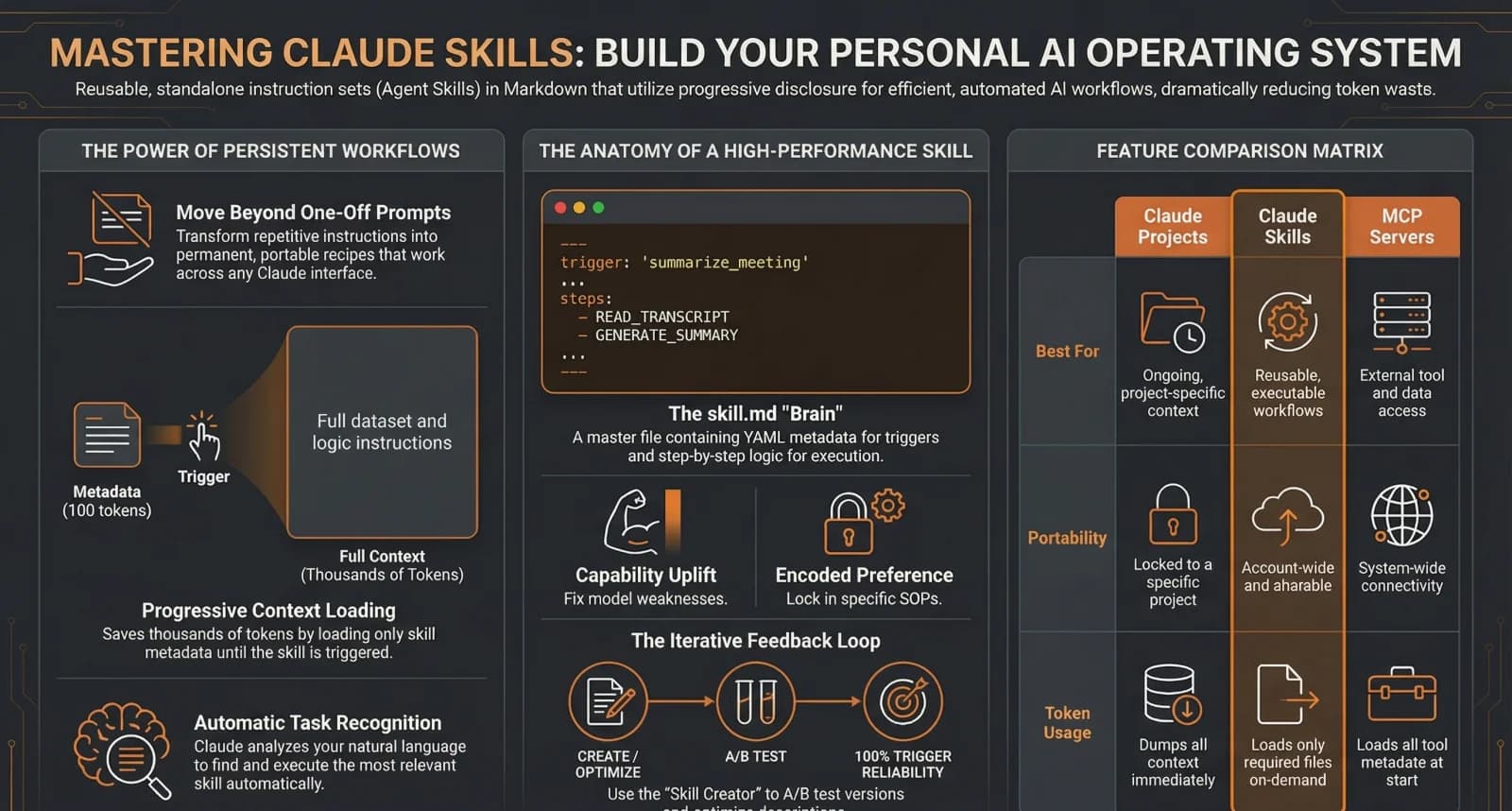
Claude Skills are modular, task-specific instructions stored as markdown files that teach Claude how to execute your workflows consistently. They function like standard operating procedures (SOPs) for your AI — you write the instructions once, save them as a skill, and Claude follows them every time the skill is triggered. Skills use a three-level progressive disclosure system that keeps the context window lean and responses accurate, and they are portable across the Claude web app, desktop app, and Claude Code.
Key Answers
- What are Claude Skills?
- Modular, task-specific instructions stored as markdown files that teach Claude how to execute your workflows consistently. Think of them as standard operating procedures (SOPs) for your AI — you write the instructions once and Claude follows them every time the skill is triggered.
- How are they different from Claude Projects?
- Projects lock instructions to a single workspace and load everything upfront. Skills are portable across your entire account (web, desktop, Claude Code) and use progressive disclosure to load instructions only when needed — saving thousands of tokens per conversation.
- Do I need to write code to create one?
- No. A skill is just a folder with a SKILL.md text file inside it. You can also use Anthropic's official Skill Creator to talk through your workflow and have it generate everything for you automatically.
- What makes Skills 2.0 different?
- Skills 2.0 added A/B testing, automated trigger tuning, regression detection, and procedural grading — bringing software engineering rigour to AI workflow building without requiring code.
Key Takeaways
- Claude Skills are reusable markdown instructions that make AI outputs consistent — you write the process once and Claude follows it every time the skill is triggered.
- Progressive disclosure loads instructions in three levels (trigger, process, knowledge), keeping context lean and avoiding the 50,000+ token bloat of loading everything upfront.
- Skills are portable across the Claude web app, desktop app, and Claude Code — unlike Projects which are locked to a single workspace.
- The highest-leverage skills directly generate revenue: lead scoring pipelines, content repurposing engines, cold email writers, and meeting notes processors.
- A curated library of 20-30 highly specific skills outperforms hundreds of generic ones — overlapping descriptions can drop trigger accuracy to as low as 20%.
What Are Claude Skills (and Why Should You Care)?
Claude Skills are reusable, markdown-based instructions that teach Claude how to execute a specific workflow consistently — like an SOP for your AI that fires automatically when a matching request comes in.
Every time you paste a detailed prompt into Claude — your brand guidelines, a 20-step review process, a specific output format — you are burning tokens and hoping the AI follows the same instructions it followed last time. It usually does not. Outputs degrade over long conversations, and re-prompting wastes both time and money. Claude Skills solve this by letting you write instructions once and reuse them forever.
There are two categories worth understanding. Capability uplift skills teach Claude to do things it normally struggles with — correctly filling out PDF forms, generating diagrams with accurate labels, or building complex UI components that match a specific design system. Encoded preference skills force Claude to follow your specific business rules — a personalised lead follow-up sequence, an NDA review checklist, a code review pipeline with your team's exact standards.
The practical impact: skills transform Claude from a chatbot you babysit into a reliable system that executes your processes consistently. The same way you would give a new employee an operations manual, you give Claude a skill.
How Do Claude Skills Work Under the Hood?
Skills use a three-level loading system called progressive disclosure — only the trigger metadata loads at startup, the full instructions load when triggered, and reference files load only when a specific step needs them.
Level 1 is the trigger. When you start a conversation, Claude loads only the name and description from each installed skill — about 30 to 100 tokens per skill. It scans these short descriptions against your message. If there is a match, either through natural language or an explicit slash command like /morning, the skill activates.
Level 2 is the process. Once triggered, Claude loads the full SKILL.md body into context — typically 1,000 to 3,000 tokens. This is where the step-by-step instructions, rules, and constraints live. Now Claude knows how to execute the task. Level 3 is the knowledge layer: if the instructions reference external files like brand assets, Python scripts, or API documentation, Claude loads only the specific files needed for the current step. A skill with 50 reference files might only load 2 of them for a given request.
Why this matters financially: a library of 30 skills costs roughly 3,000 tokens to have available at all times. Without progressive disclosure, loading those same instructions upfront would cost 50,000+ tokens per conversation — degrading output quality and running up your bill.
What Is the Anatomy of a Claude Skill?
A skill is a folder containing a required SKILL.md file plus optional subfolders for reference files, scripts, and assets. The SKILL.md has YAML frontmatter (name and description) and a markdown body with step-by-step instructions.
At a technical level, a skill folder contains SKILL.md as the brain of the skill, an optional references/ folder for context files loaded on demand, an optional scripts/ folder for executable code Claude can run, and an optional assets/ folder for images, templates, and logos. Skills can live in two places: .claude/skills/skill-name/ inside a workspace (project-specific), or ~/.claude/skills/ in your home directory (global, available everywhere).
The SKILL.md file has two parts. The YAML frontmatter contains the metadata — the skill name and a description that determines when the skill fires. The description is the most important line in the file. Include specific keywords, phrases, and use cases that should trigger it. The markdown body below contains your step-by-step instructions: the goal, the process, the rules, the expected output format, and any constraints.
What Can You Actually Build With Claude Skills?
The highest-leverage skills are deeply specific workflows built around your business — lead scoring pipelines, content repurposing engines, meeting notes processors, brand theme factories, cold email writers, and invoice data extractors.
A lead scoring pipeline takes a raw CSV of 50 leads, scores each one against your ICP criteria, and outputs a colour-coded Excel spreadsheet with priority rankings, reasoning for each score, and recommended next actions. A content repurposing engine takes a YouTube transcript and generates a LinkedIn post, a Twitter thread, and a newsletter draft — all matching your specific tone of voice. A meeting notes processor ingests a raw transcript from Fireflies or Otter, generates an executive summary, identifies key decisions, and assigns action items to individuals.
A brand theme factory stores your hex colours, fonts, and logo once — every landing page, slide deck, or document Claude creates from that point on automatically matches your exact visual identity. A cold email campaign writer analyses your best-performing outreach emails as reference examples and generates new personalised sequences using the same proven formula. An invoice data extractor runs a Python script inside the skill to scan PDF invoices and extract structured JSON — vendor names, line items, amounts, and tax details. What used to take 15 minutes of manual data entry runs in seconds.
How Do You Build Your First Claude Skill?
Identify a repeatable workflow, create a folder in .claude/skills/, write YAML frontmatter with a keyword-rich description, add numbered process instructions, test with a real task, and iterate based on the output.
Start by identifying a repeatable workflow. Pick something you do regularly that has clear steps and consistent rules — lead qualification, content formatting, report generation, code review. Anything where you find yourself re-explaining the same process to Claude. Then create the folder structure: make a folder in .claude/skills/your-skill-name/ and create a SKILL.md file inside it. Add references/ and scripts/ subfolders if you need supporting files.
Write the YAML frontmatter next — name the skill and write a specific, keyword-rich description. This is what determines when the skill triggers. Be generous with trigger phrases. Then break your workflow into clear, numbered steps in the markdown body. Include the goal, the process, the rules, the expected output format, and any constraints. Point to reference files for large datasets rather than putting them inline.
Test with a real task. Check: does it trigger correctly? Does it follow all the steps? Is the output format right? Are reference files loading when needed? Then iterate. Skills get better the more you refine them. When Claude makes a mistake, update the instructions to prevent that specific failure. Pro tip: do not write the skill manually from scratch. Use Anthropic's official Skill Creator — describe your workflow conversationally and it generates the folder structure, frontmatter, instructions, and reference files for you automatically.
What Are the Best Practices for Building Skills?
Keep SKILL.md under 500 lines and point to reference files instead of dumping content inline. Build small, modular skills that chain together rather than monoliths. Design for human-in-the-loop approval. And curate ruthlessly — 20 specific skills beat 200 generic ones.
Point, do not dump. Keep your SKILL.md under 500 lines. Large datasets, style guidelines, and templates belong in reference files — not inline. Your skill should point to reference files when a specific step needs them, not load everything upfront. Stack small skills, do not build monoliths. Avoid one massive do-it-all skill. Build small, modular skills that chain together. A lead analysis skill feeds into a presentation skill which feeds into a follow-up email skill. Each one stays focused and reliable.
Design for human-in-the-loop. Build pause points into your skills. Have Claude ask for approval before proceeding to the next phase. Generate multiple variations of key outputs so you can choose the best one. Build self-healing rules: add instructions that tell Claude to update its own rules when you correct mistakes. If you fix an output, the skill saves the correction as a new rule and uses your approved output as a reference example for future runs.
Curate, do not hoard. A library of 20 to 30 highly specific skills will vastly outperform hundreds of generic ones. Too many skills with overlapping descriptions confuse Claude's trigger system and can drop activation accuracy to as low as 20 percent. Security note: treat downloading public skills from GitHub like running code from a stranger. Always audit the SKILL.md file for hidden instructions, malicious endpoints, or prompt injection before activating it.
What Changed With Skills 2.0?
Skills 2.0 added four capabilities that bring software engineering rigour to AI workflow building: A/B testing, regression detection, trigger tuning, and procedural grading — all without requiring code.
A/B testing runs parallel evaluations comparing outputs with the skill versus without. You get hard metrics on pass rates, execution time, and token usage to mathematically prove your skill improves outputs. Regression detection automatically tests if a newly released base model is natively better at a task than your custom skill — if the model's baseline surpasses your skill, the system flags it for retirement.
Trigger tuning fires dozens of test prompts at your skill to identify false triggers and automatically rewrites the YAML description until the skill fires reliably on the right requests. Procedural grading takes examples of good outputs and auto-grades your skill against those expectations — identifying exactly where the process fails so instructions can be rewritten. Together, these four features turn skill building from a craft into a measurable engineering discipline.
What Are the Most Common Mistakes to Avoid?
The biggest mistakes are hoarding marketplace skills, leaving competing skills active, building non-revenue skills first, putting everything in the SKILL.md, and writing vague trigger descriptions that never fire reliably.
Hoarding marketplace skills bloats your context with competing descriptions. Claude cannot reliably pick the right one when 15 skills claim to handle content creation. Leaving competing skills active is a similar trap — if you have your own brand skill enabled alongside Anthropic's official Theme Factory, they will cannibalise each other. Toggle off duplicates. Building non-revenue skills first is a strategic mistake: the highest-leverage skills directly generate revenue or capture attention. Start with lead scoring, sales follow-ups, and content repurposing before internal organisational tools.
Putting everything in SKILL.md is a common technical mistake. If your instructions are over 500 lines, you are dumping context that should be in reference files — this degrades output quality and wastes tokens on every invocation. Vague trigger descriptions fail silently. "A helpful business skill" will not trigger on anything. Be specific: "Use when the user asks to score leads, qualify prospects, or rank a lead list against ICP criteria."
How Do You Get Started With Claude Skills Today?
Pick one repeatable task you do at least weekly, tell Claude to create a skill for it, let the Skill Creator generate the files, test on a real task, and refine the instructions based on the output. Start with one skill, get it working, then build the next one.
You do not need a technical background to build your first skill. The fastest path is to pick one repeatable task you do at least weekly, then open Claude and say: "Create a skill that does this task. Here is how I currently do it: [describe your steps]." Let the Skill Creator generate the files. Test it on a real task. Refine the instructions based on the output. Start with one skill. Get it working reliably. Then build the next one.
Within a week, you will have a small library of skills that save you hours of repetitive prompting — and the outputs will be more consistent than anything you have gotten from Claude before. Want help building custom AI workflows for your business? ManaTech designs and implements complete skills libraries tailored to your specific operations, alongside the custom applications that put those workflows to work.
Research Data
Key strategies and factors based on original research
| Skill Type/Feature | Primary Use Cases | Trigger Mechanisms | Token & Context Efficiency | Technical Components | Common Pitfalls |
|---|---|---|---|---|---|
| Built-in Skills (Anthropic Official) | Standard tasks such as document manipulation (PDF, Word, PowerPoint, Excel), brand guidelines, theme styling, and UI/UX design via Theme Factory. | Contextual automatic activation based on user query; manual triggers via 'Try in chat' or slash commands. | Uses 'Progressive Disclosure' to load metadata initially (~30-100 tokens); full body fetched only when triggered. | Pre-configured by Anthropic; accessible via Settings > Capabilities > Skills; includes tool definitions and instructions. | Confusion between overlapping skills; excessive active skills bloating system prompt; obsolescence as base models (e.g., Opus 5) improve. |
| Custom Skills | Niche business workflows (lead scoring, SEO auditing, contract generation), personal preferences, coding standards, or repetitive meeting note processing. | Natural language triggers defined in YAML; explicit slash commands (e.g., /lead-scorer) or specific keywords (e.g., 'Gmail summary'). | Reducer context usage by storing SOPs/examples in external files; metadata (~100 tokens) loaded first, instructions (~5,000 tokens) on demand. | Folder containing 'skill.md' with YAML front matter; stored in personal (~/.claude/skills) or project (.claude/skills) directories; optional 'scripts' or 'references' folders. | Poorly defined/vague trigger descriptions leading to false triggers or failure to fire; excessive file length (recommended under 500 lines). |
| Skill Creator / Skills 2.0 Features | Automated creation/optimization of skills, A/B testing against baseline model, running evals, and verifying trigger reliability. | Slash command /skill-creator or natural language prompts (e.g., 'make a new skill') in web interface or Claude Code. | Enables multi-agent testing and token measurement; uses benchmarks to determine if skill cost outweighs raw model performance. | Plugin system; HTML benchmark reports; automated evaluation agents; expectation lists/grading criteria; YAML front matter. | Relying on 'vibes' instead of quantitative evals; failing to prune skills after model upgrades; skipping clarification during creation. |
| Capability Uplift Skills | Filling model gaps such as precise PDF form filling, complex OCR, specialized frontend design standards, or high-end domain expertise. | Triggered when the model identifies a task it lacks native high-level proficiency in or requires specialized domain logic. | Progressively loads reference files or scripts only during high-complexity tasks to prevent constant context bloat. | Bundled instructions, patterns, techniques, and domain-specific 'rules' folders that enhance base model logic. | Obsolescence as base models update; skills may produce 'worse' output than newer models if not updated or retired. |
| Encoded Preference Skills | Internal compliance, unique company tone of voice, NDA review checklists, organizational SOPs, and standardized team workflows (e.g., YouTube Pipeline). | Invoked through specific project-related keywords, departmental workflow commands, or requests matching defined workflow titles. | High durability; saves tokens by not requiring repetition of rules or full prompts in every individual chat session. | Workflow-specific markdown files (SOPs), templates, brand assets, and step-by-step logic; may combine multiple tools. | Failing to update rules as processes change; overly generic descriptions; low fidelity to manual workflows; excessive file length. |
| Progressive Disclosure (Mechanism) | Managing context for users with numerous specialized skills to stay within token limits. | Three-level loading hierarchy: 1. Metadata (Summary), 2. Body (Process), 3. External Files (Knowledge/Scripts). | Initial cost ~100 tokens; body up to 5,000 tokens; external assets fetched ad-hoc with virtually no limit. | YAML Front Matter (metadata) and referenced markdown or script files. | Including too much 'knowledge' in the skill.md process file instead of separate reference files, causing immediate context bloat. |
Original research by ManaTech
Frequently Asked Questions
How do Claude Skills work technically?
Skills use a three-level system called progressive disclosure. Level 1: Claude loads only the skill name and description (30-100 tokens). Level 2: When triggered, it loads the full SKILL.md instructions. Level 3: It loads reference files only when a specific step needs them. This keeps the context window lean and responses accurate.
How do you create a Claude Skill?
Create a folder in .claude/skills/your-skill-name/ with a SKILL.md file inside. The file needs YAML frontmatter (name and description) and a markdown body with step-by-step instructions. Optionally add reference files, scripts, and assets in subfolders. You can also use Anthropic's official Skill Creator to generate everything conversationally.
Where do Claude Skills live on my machine?
Skills can live in two places. Project-specific skills go in .claude/skills/skill-name/ inside a workspace and are only available in that project. Global skills go in ~/.claude/skills/ in your home directory and are available everywhere across all projects.
How many skills should I have installed?
A curated library of 20-30 highly specific skills is ideal. Installing hundreds of community skills bloats your context with competing descriptions — Claude cannot reliably pick the right one when 15 skills all claim to handle content creation. Fewer, more specific skills trigger more accurately.
Are Claude Skills safe to download from GitHub?
Treat downloading public skills like running code from a stranger. Always audit the SKILL.md file for hidden instructions, malicious endpoints, or prompt injection before activating it. This attack vector is sometimes called comet jacking. Only install skills from trusted sources.
What is the best first skill to build?
Pick a repeatable workflow you do at least weekly that has clear steps and consistent rules — lead qualification, content formatting, report generation, or code review. Start with one skill, refine it until it works reliably, then build the next one. Revenue-generating skills (lead scoring, sales follow-ups, content repurposing) deliver the highest leverage.
Think You've Got It?
10 questions to test your understanding — instant feedback on every answer
Question 1 of 10
In the context of Claude, what is the primary structural difference between a 'Project' and a 'Skill'?
Question 2 of 10
What is the technical term for Claude's method of loading information in stages only when needed, rather than consuming all context up front?
Question 3 of 10
According to the source material, approximately how many tokens are consumed at startup for each installed Skill's metadata?
Question 4 of 10
Which file is considered the 'brain' or mandatory entry point for any Claude Skill folder?
Question 5 of 10
What is the primary difference between 'Capability Uplift' skills and 'Encoded Preference' skills?
Question 6 of 10
In Answer Engine Optimisation (AEO), why is targeting long-tail conversational keywords considered critical?
Question 7 of 10
What does the 'Capsule Content' technique involve to improve Generative Engine Optimisation (GEO)?
Question 8 of 10
What is the purpose of the 'Trigger Tuning' or 'Description Optimisation' feature in the Skill Creator?
Question 9 of 10
How do MCP (Model Context Protocol) servers and Claude Skills typically work together?
Question 10 of 10
According to the AEO strategy discussed by Julia McCoy, what percentage of AI overview citations currently rank beyond the top 10 positions in Google search?
Related Content
The Rise of Agentic Development: How AI Agents Are Replacing Development Teams
The shift from writing code to orchestrating AI agents is redefining software development. What agentic development means for project timelines, costs, and the SMBs who need custom software.
Read more →blogClaude Code for Business Owners: Automate Your Business Without a Dev Team
Claude Code is an agentic coding tool that works autonomously for minutes or hours, not just completing code snippets. Nate Herk says he would teach a 10-year-old to build agentic workflows with it. Here is what business owners need to know.
Read more →blogChatGPT vs Claude vs Gemini for Small Business in 2026: A Practical Comparison
Most small business owners pick the first AI tool they try and stick with it. That is the most expensive mistake you can make in 2026. The three leading platforms — ChatGPT, Claude, and Gemini — are not interchangeable. Each one wins decisively for different tasks, and 70% of growing service firms now run all three concurrently for that exact reason.
Read more →blogWhat Is MCP (Model Context Protocol) and How Can It Transform Your Business?
Model Context Protocol (MCP) is the open standard that lets AI assistants connect to your business tools — databases, CRMs, file systems, and APIs — without custom integration code. With 18,000+ MCP servers available and backing from Anthropic, OpenAI, Google, and Microsoft, MCP is becoming the USB-C of AI.
Read more →blogWhat Is Google Gemini 3.1 Pro and How Can Your Business Use It?
Google Gemini 3.1 Pro is Google DeepMind's most advanced AI model, released in February 2026. It doubles reasoning performance over its predecessor, processes 1 million tokens of context, and costs 7.5x less than Claude Opus 4.6 on input tokens. Here is what it means for your business.
Read more →Want to explore this topic further?
Book a free discovery call to discuss how ManaTech can help your business implement these ideas.
Book a Discovery Call