
When Should You Outgrow Zapier and Build a Custom Automation System?
Quick Answer
Zapier and similar no-code automation tools (Make, n8n) are excellent for connecting SaaS tools and automating simple workflows. You should consider migrating to a custom automation system when: your Zapier bill exceeds $500-1,000 per month, you hit task limits that throttle business-critical workflows, you need complex conditional logic that visual builders cannot express, your automations touch customer-facing processes where reliability is non-negotiable, or you have data spread across 10 or more tools that need unified orchestration. Companies that migrate typically reduce automation costs by 70-85% while gaining reliability, speed, and the ability to handle edge cases that no-code tools silently drop.
Key Answers
- When is it time to stop using Zapier?
- When your monthly bill exceeds $500-1,000, you hit task limits on business-critical workflows, you need branching logic with more than 3-4 conditions, your zaps break silently and you discover failures hours or days later, or you are chaining 5 or more zaps together to accomplish what should be a single workflow.
- How much can you save by replacing Zapier with custom automation?
- Companies typically reduce automation costs by 70-85%. One documented case went from $600 per month on Zapier to $75 per month with a custom system running on a single server. The savings come from eliminating per-task pricing and removing middleware between systems that can talk directly.
- What are the risks of migrating off Zapier?
- The main risks are workflow downtime during migration, undocumented zaps that no one remembers creating, and the learning curve for maintaining custom code. Mitigate these by running parallel systems during transition, auditing all active zaps before migration, and choosing a tech stack your team can maintain.
- Should I migrate to Make or n8n instead of building custom?
- Make and n8n solve some of Zapier's limitations (better pricing, more complex logic) but still have fundamental constraints: per-execution pricing, limited error handling, and no ability to handle truly custom business logic. If you are outgrowing Zapier because of cost, Make or n8n buys you time. If you are outgrowing it because of capability, go custom.
Key Takeaways
- Zapier is ideal for early-stage automation (under 1,000 tasks per month) but becomes expensive and unreliable as workflows grow in complexity and volume.
- The financial tipping point is typically $500-1,000 per month in Zapier costs, at which point a custom system pays for itself within 6-12 months.
- Companies migrating from Zapier to custom automation report 70-85% cost reduction, with one documented case going from $600 per month to $75 per month.
- The biggest driver for migration is reliability, not cost — Zapier workflows fail silently, and for customer-facing processes this is unacceptable.
- A phased migration (one workflow at a time, running parallel with Zapier) eliminates risk and lets you validate savings before committing fully.
What Are the Signs You Have Outgrown Zapier?
Zapier is a brilliant tool for its intended purpose: connecting two or three SaaS applications with simple trigger-action logic. It is not designed for complex multi-step business workflows, high-volume processing, or anything where reliability has to be guaranteed. The problem is that businesses start with Zapier when they are small and never reassess as they grow.
The clearest sign is cost. Zapier's per-task pricing means that as your business grows, your automation bill grows proportionally. A workflow that processes 100 leads per month at $30 costs $300 per month at 1,000 leads and $3,000 per month at 10,000 leads. At that scale, a custom system running on a $50-per-month server is dramatically cheaper.
The second sign is complexity. When you find yourself chaining 5 or more zaps together, using webhooks to pass data between multi-step workflows, or building elaborate paths and filters to handle business logic, you have exceeded what Zapier was designed to do. Every additional step in a zap chain is a potential failure point, and Zapier's error handling is limited to retries and notifications.
The third sign — and often the final straw — is silent failure. Zapier workflows can fail without anyone noticing for hours or days. For internal processes, this is annoying. For customer-facing processes, it is unacceptable. When a lead form submission is supposed to trigger an instant follow-up email and a CRM entry, and the zap silently fails, you lose that lead. Custom systems can be built with comprehensive error handling, alerting, and fallback logic.
How Much Is Zapier Actually Costing Your Business?
The subscription cost is just the beginning. The total cost of Zapier includes: the monthly plan (often $200-1,000 for growing businesses), staff time spent building and maintaining zaps (typically 5-10 hours per month), time spent investigating and fixing failed zaps, the cost of tasks that fail silently and are never recovered (lost leads, missed invoices, delayed responses), and the opportunity cost of workflows you cannot build because Zapier cannot handle the logic.
One documented case study shows a company spending $600 per month on Zapier to automate lead routing, CRM updates, and customer notifications. After migrating to a custom system, their automation costs dropped to $75 per month — a server and a few API subscriptions. The custom system also handled edge cases that Zapier silently dropped, recovering an estimated 15% of leads that were previously lost to automation failures.
What Does a Custom Automation System Actually Look Like?
A custom automation system is not as complex as it sounds. At its core, it is a server that listens for events (a form submission, an email, a webhook), processes them according to your business logic, and triggers actions in your other systems (CRM update, email sent, invoice created). The difference from Zapier is that you control every aspect of the logic, error handling, and data flow.
The typical architecture includes: an API layer that receives webhooks and triggers from your tools, a task queue that processes workflows reliably (retrying failures, handling rate limits), business logic modules that encode your specific rules and conditions, direct API integrations with your tools (no middleware), and a monitoring dashboard that shows workflow status, success rates, and errors in real time.
For a growing SMB, this can run on a single $50-per-month server or a serverless platform. Combined with AI-powered processing for data extraction and decision-making, a custom system can handle workflows that would require dozens of zaps and multiple paid Zapier tiers.
How Do You Migrate from Zapier Without Breaking Everything?
Rule one: never turn off Zapier before the custom system is proven. Run both in parallel for at least 2-4 weeks. The custom system handles the workflow while Zapier stays active as a fallback. Once you have confirmed that the custom system handles 100% of cases (including edge cases Zapier was silently dropping), turn off the zap.
Start with your highest-cost or most-problematic workflow. This is usually the one that uses the most Zapier tasks, breaks most frequently, or handles the most business-critical data. Migrating this workflow first maximises your cost savings and demonstrates the value of custom automation to your team.
Before migration, audit every active zap. Most businesses discover zaps they forgot about, zaps that are broken but nobody noticed, and zaps that duplicate work. Clean up first. Then categorise remaining zaps: critical (migrate to custom), useful (keep on Zapier), and unnecessary (turn off). Most businesses find that 30-40% of their zaps can simply be turned off.
Should You Switch to Make or n8n Instead of Building Custom?
Make (formerly Integromat) and n8n are legitimate Zapier alternatives that solve specific problems. Make offers better pricing (operations are cheaper than Zapier tasks) and more complex visual workflow building. n8n can be self-hosted, eliminating per-task costs entirely. If your primary issue is Zapier pricing and your workflows are relatively straightforward, these tools can reduce costs by 50-70% with minimal migration effort.
However, Make and n8n share Zapier's fundamental limitation: they are visual workflow builders designed for connecting pre-built integrations. If your business logic requires custom API calls, complex conditional branching, database queries, or AI-powered decision-making, you will hit the same walls — just at a higher ceiling and a lower cost.
The decision framework: if you are outgrowing Zapier because of cost alone, try Make or n8n first. If you are outgrowing it because of capability — you need custom logic, guaranteed reliability, or AI-powered processing — go custom. The incremental cost of building custom versus setting up Make is typically $10,000-20,000, but the capability difference is transformational.
How Do You Start Building Custom Automation?
Step one: audit your Zapier account. Export a list of all active zaps, their task usage, and their error rates. Identify the top 3-5 workflows by cost and complexity. These are your migration candidates.
Step two: document the business logic for your top workflow. What triggers it? What conditions determine the path? What systems does it touch? What happens when something fails? This document becomes the spec for your custom system.
Step three: build the first custom workflow in 4-6 weeks. Run it parallel with Zapier for 2-4 weeks. Measure cost, reliability, and speed. If the custom system wins on all three (it almost always does), turn off the zap and move to the next workflow. Within 3-6 months, you will have migrated your critical workflows and reduced your automation costs by 70-85%.
Research Data
Key strategies and factors based on original research
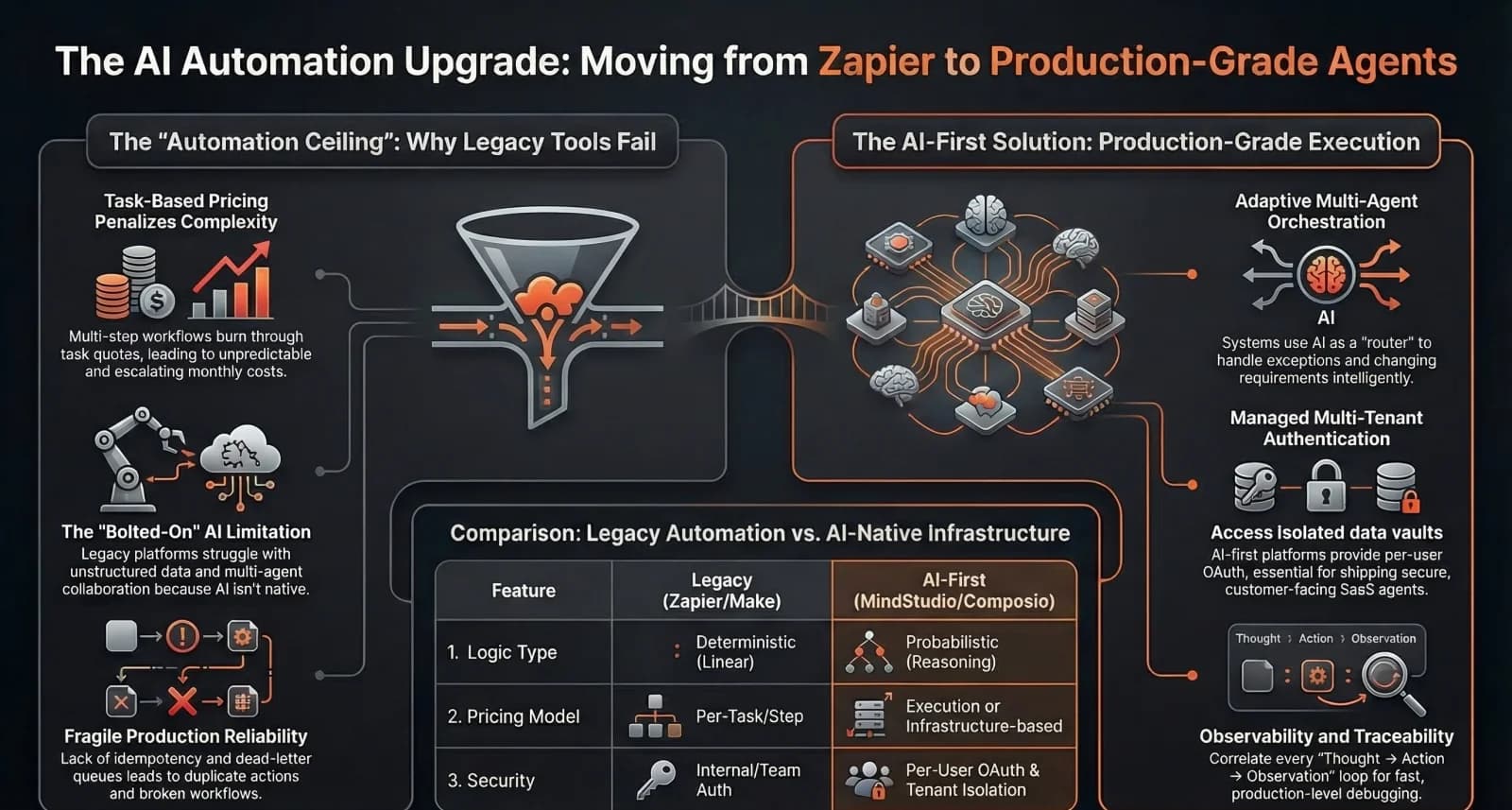
| Platform | Automation Depth | Pricing Model | Complexity | Scalability | Ideal Use Case | AI Capability |
|---|---|---|---|---|---|---|
| Custom-Built (Infrastructure/Code-First) | Level 4 — Infrastructure | Infrastructure resources | Developer-centric | Maximum; designed for high-volume, multi-tenant SaaS products | Customer-facing SaaS agents; revenue-critical actions with side effects | AI-Native; supports multi-agent orchestration and dynamic tool use |
| n8n | Level 2.5 — Advanced Logic | Execution-based | Developer-centric | High; supports self-hosting and custom integrations | API-heavy logic, internal assistants, and developer-managed automation | Limited; lacks production-grade agent execution semantics natively |
| Make | Level 2 — Logic | Operation-based | Low-code | Moderate; suitable for multi-step logic but hits event-driven ceilings | Complex branching workflows; internal low-stakes deterministic tasks | Limited; AI is not a native architectural primitive |
| Zapier | Level 1 — Task | Task-based | No-code | Limited; structural ceilings and brittle at high complexity/volume | Simple, linear internal workflows; low-volume app-to-app triggers | Features added or bolted on; built for deterministic automation |
Original research by ManaTech
Frequently Asked Questions
Can I keep using Zapier for some workflows while building custom for others?
Yes, and this is the recommended approach. Keep Zapier for simple, non-critical workflows (like internal notifications or data syncing between non-essential tools) and build custom automation for high-volume, business-critical, or customer-facing workflows. Over time, you can migrate more workflows to the custom system as you build confidence.
How long does it take to build a custom automation system?
A focused custom automation system for a specific workflow takes 4-8 weeks. This includes API integrations, business logic, error handling, monitoring, and a dashboard for visibility. More complex orchestration systems handling 5-10 workflows take 8-16 weeks. Start with one workflow and expand.
What tech stack should I use for custom automation?
For most SMBs, a Node.js or Python backend with a task queue (BullMQ, Celery) and a simple dashboard covers 90% of automation needs. Host on a $20-50 per month server or serverless platform. The tech matters less than the architecture — build for observability (logging, error alerts) from day one.
What about n8n or Make as Zapier alternatives?
Make (formerly Integromat) offers better pricing and more complex logic than Zapier. n8n can be self-hosted, eliminating per-task costs entirely. Both are good intermediate steps if your main issue is Zapier pricing. But if you are hitting capability limits — complex conditional logic, custom error handling, or customer-facing reliability requirements — you will eventually outgrow these tools too.
How do I avoid vendor lock-in with custom automation?
Build your custom system using standard protocols and APIs rather than proprietary SDKs where possible. Use a message queue for workflow orchestration so you can swap individual integrations without rebuilding the system. Document every workflow with input/output specs so any developer can maintain or extend the system.
Think You've Got It?
10 questions to test your understanding — instant feedback on every answer
Question 1 of 10
According to the migration guides, what is the primary economic drawback of Zapier's 'task counting' system for complex workflows?
Question 2 of 10
In the 'Automation Maturity Ladder', which level is characterised by automation becoming the company's operational backbone and being deeply embedded into products?
Question 3 of 10
What does the term 'semantic misalignment' refer to in the context of AI agent tool calling?
Question 4 of 10
Why is 'idempotency' considered a critical requirement for production-grade AI agents performing side-effectful actions?
Question 5 of 10
In a 'Multi-tenant Authentication' setup for a SaaS agent, what is the primary purpose of 'Per-user OAuth'?
Question 6 of 10
What is the role of a 'Dead Letter Queue' (DLQ) in an intelligent automation platform?
Question 7 of 10
Which migration strategy involves running a new workflow in parallel with the legacy version to compare outputs without taking real-world action?
Question 8 of 10
How does an 'Action Plane' differ from a traditional 'Workflow' in the context of AI agents?
Question 9 of 10
The 'MindStudio' platform features an 'Architect' tool. What is its primary function in the migration process?
Question 10 of 10
Why might a business choose to stay on Zapier despite the emergence of AI-native alternatives?
Related Content
Building an AI Employee: Custom Applications That Replace Repetitive Tasks
How custom-built AI systems act as digital employees, handling meeting notes, inbox management, analytics, and onboarding so your team can focus on growth.
Read more →blogIs Your Business Paying for SaaS You Could Replace with a Custom Build?
The average employee costs their company $758 per month in SaaS subscriptions. Over 5 years, SaaS spending exceeds custom development costs by 72%. Here is how to identify which tools are worth replacing and when a custom build makes financial sense.
Read more →blogThe Hidden Cost of SaaS Sprawl: Why Your $200/Month Tool Stack Actually Costs $2,000
The average small business pays for over 15 SaaS subscriptions and wastes 30% of that spend on unused seats, duplicate tools, and integration middleware. Here is a framework for calculating your real SaaS cost — and what to do when it crosses the line.
Read more →blogWhat Is MCP (Model Context Protocol) and How Can It Transform Your Business?
Model Context Protocol (MCP) is the open standard that lets AI assistants connect to your business tools — databases, CRMs, file systems, and APIs — without custom integration code. With 18,000+ MCP servers available and backing from Anthropic, OpenAI, Google, and Microsoft, MCP is becoming the USB-C of AI.
Read more →blogHow to Build AI Agents for Your Business Without Writing Code
AI agents go beyond chatbots — they take actions, make decisions, and complete multi-step workflows autonomously. IDC expects AI copilots embedded in 80% of enterprise apps by 2026. Here is how to build your first AI agent without code.
Read more →Want to explore this topic further?
Book a free discovery call to discuss how ManaTech can help your business implement these ideas.
Book a Discovery Call